From Specifications to Software: Building My Own Autonomous Engineering Harness
October 20, 2026 · Architecture · Experiments · Lessons
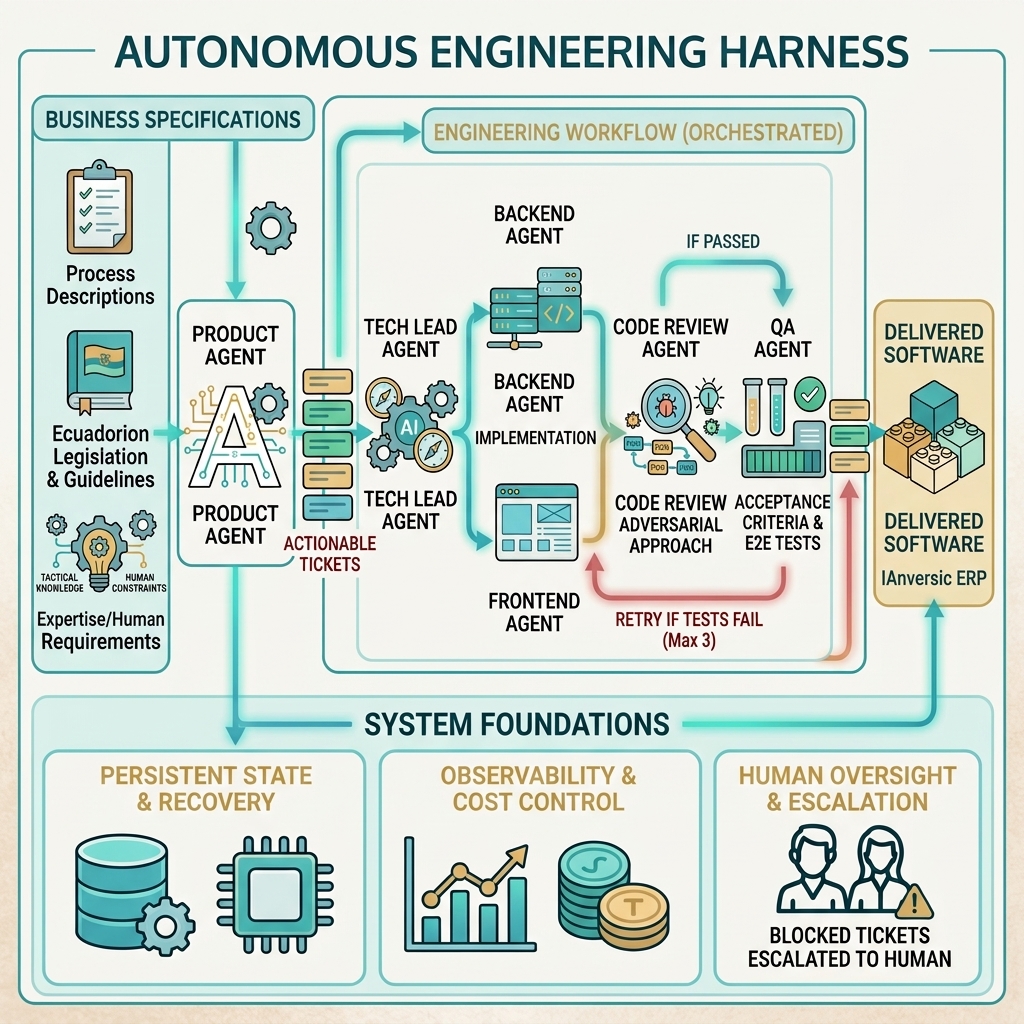
A practical look at how I built my own Autonomous Engineering Harness to turn specifications into working software using specialized AI agents, structured tickets, persistent engineering decisions, and independent code review and QA.
It started with an ERP
A few months ago, my husband asked me to help him build several modules for an enterprise resource planning (ERP) system.
He is an accountant who has spent the last few years working with some of the largest ERP systems on the market. Through that experience, he noticed a recurring problem: many systems are generic enough that companies end up adapting their processes to fit the software, rather than having the software adapt to their actual needs.
He wanted to approach the problem from the opposite direction: start by understanding how a company works, then build software around its processes.
He brought the business knowledge and plenty of ideas. My job was to figure out how to turn them into a working product.
As a software engineer, I had experience across different stages of the development lifecycle, including building a mobile application during the COVID-19 pandemic. Developing an ERP wasn't entirely new territory either: I had been building Odoo modules since 2017.
The challenge wasn't simply building the software. It was finding a reliable way to build it.
Why coding agents need an engineering process
With the current hype around vibe coding, it's tempting to think that building a good product is simply a matter of asking Claude, OpenAI, or another coding agent to implement it.
These tools are incredibly powerful, and they can make software development much more accessible. But producing code is not the same as delivering a reliable product.
I've been experimenting with AI in software development since 2023, evaluating open-source and proprietary LLMs and using them in my daily work and personal projects. I've seen firsthand how much these tools can accelerate development. I've also learned that giving coding agents too much freedom without clear constraints, verification, and recovery mechanisms creates unnecessary risks.
I had already explored this idea in a previous role, where I built a Claude-based workflow to help me work through Jira tasks. It connected the process from a Jira ticket to implementation, code review, and QA before a pull request was created.
That experience gave me a starting point. But building an ERP required something more comprehensive.
I didn't just need agents that could work independently. I needed an engineering system that could turn business requirements into useful software while keeping the process structured, traceable, and verifiable.
I decided to combine Spec-Driven Development with Claude Code, using specifications as the foundation for implementation and specialized agent skills to coordinate the work.
I kept product branding and UI/UX design outside the initial engineering workflow. I used a separate agent to help explore those aspects, allowing the engineering harness to focus on translating requirements into working software.
That decision helped define the scope of the problem I needed to solve.
The engineering challenges
Before designing the workflow, I identified several challenges that couldn't be solved by simply adding more agents.
1. Turning different sources of information into actionable specifications
Requirements came from several places: process descriptions, Ecuadorian legislation and official guidelines, my husband's experience with real business operations, and my own requirements around user management, security, and integrations.
These sources needed to become specifications that coding agents could understand and implement. But I also needed to stay involved in interpreting requirements and validating business decisions. An agent shouldn't make assumptions about how a business process should work without consulting me when clarification is needed.
2. Breaking complex processes into manageable tasks
Large features are difficult to implement and audit as a single unit. I wanted small, traceable tickets that could be reviewed individually, with dependencies and implementation order explicitly considered.
3. Keeping the code maintainable
I needed to understand the backend and frontend changes being introduced. In my experience, coding agents can sometimes produce unnecessary comments, redundant tests, or changes that are disproportionate to the original task.
The goal wasn't to eliminate documentation or testing. It was to make both purposeful and proportional to the change.
4. Enforcing boundaries
The agents needed clear instructions about implementation standards, permitted files, and project scope. They should not perform unauthorized operations or access resources outside their intended boundaries.
5. Introducing independent verification
Implementation could not be the final step. I needed separate code review and QA stages capable of challenging the solution, identifying defects, and returning tickets for correction.
6. Preserving context and recovering from failures
Agent workflows need persistent state. I once heard an author describe coding agents as senior engineers with very poor memory. That analogy resonated with me.
The system needed to preserve ticket status, decisions, relevant findings, and session progress so that work could resume after interruptions without relying entirely on the context of a single conversation.
7. Controlling token consumption
Cost was another engineering constraint. I wanted to measure token usage alongside completed tickets so I could identify expensive patterns and improve the workflow rather than treating consumption as an unavoidable cost of automation.
Designing a development team of agents
I approached the problem by drawing on how real software development teams work, taking inspiration from the great colleagues I had the opportunity to work with at Newsela.
Instead of treating every agent as a general-purpose developer, I divided the work into specialized roles coordinated through an orchestrated workflow.
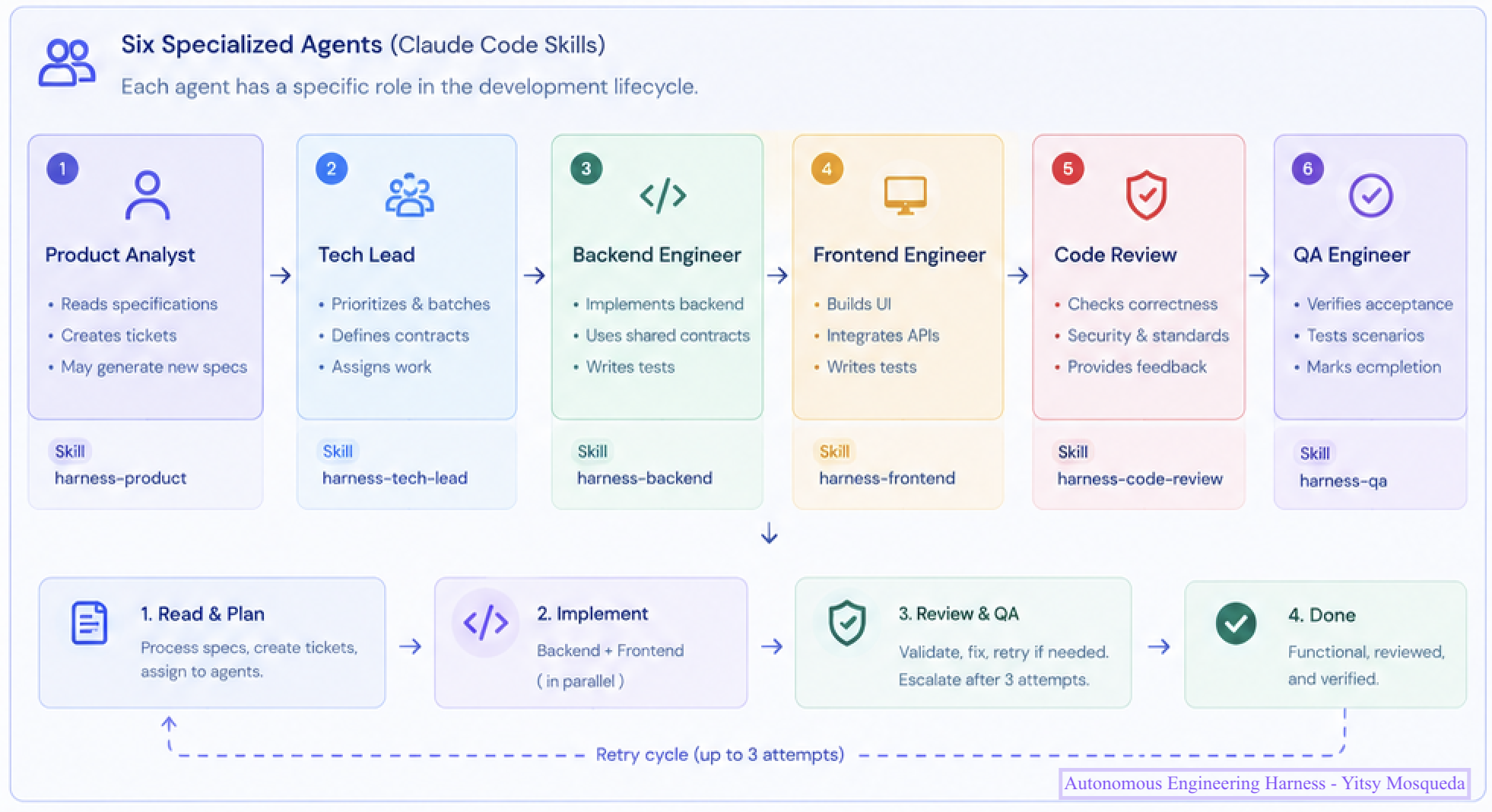
The agent workflow coordinates requirement analysis, planning, implementation, code review, and QA.
1. Product Agent
The Product Agent analyzes the specifications and supporting materials, which can include legislation, manuals, websites, and process documentation.
It helps identify missing information and break requirements into epics and self-contained tickets. When a business decision is unclear, it should consult me rather than inventing a solution.
The objective is to turn potentially ambiguous requirements into actionable work without losing the original business intent.
2. Tech Lead
The Tech Lead organizes the backlog, considers dependencies, defines implementation contracts, and assigns work to the appropriate agents.
Tickets are organized into implementation batches, with dependencies considered before work begins. The aim is to complete a coherent set of related tasks before moving to the next stage, making progress easier to follow and audit.
The Tech Lead also determines whether a ticket belongs to the frontend or backend workflow.
Turning specifications into verifiable tickets
Breaking requirements into small tasks is only useful if those tasks contain enough information to be implemented and verified independently.
That's why I created a structured ticket template rather than relying on free-form task descriptions. Each ticket captures not only what needs to be implemented, but also where the requirement originated, how it fits into the architecture, what it depends on, and how completion will be verified.
For example, a ticket contains fields such as:
{
  "schema_version": "1.0",
  "id": "TKT-{NNNN}",
  "feature_id": "EPIC-{MODULE}-{AREA}",
  "title": "{Imperative verb + object}",
  "source": {
    "spec_file": "{relative/path/to/spec.md}",
    "story_ids": ["{USx.y}"]
  },
  "classification": {
    "layer": "{backend|frontend|migration|contract|seed_data}",
    "module": "{core|presupuesto}",
    "phase": "{catalogs|transactions|reports|iam|tenancy|config|integration}"
  },
  "dependencies": {
    "depends_on": [],
    "blocks": []
  },
  "acceptance_criteria": [
    {
      "id": "AC-01",
      "criterion": "{Observable, verifiable behavior}",
      "testable": true
    }
  ],
  "status": "backlog"
}
This structure serves several purposes.
First, every ticket retains traceability to its source specification and user stories. Second, classification and dependency information help the Tech Lead organize implementation in the correct order. Finally, explicit acceptance criteria give the review and QA stages something concrete to verify.
The complete template also defines implementation constraints, affected file paths, expected tests, embedded business context, execution history, verification history, and timestamps. Its Definition of Done covers acceptance criteria, code review findings, tests for testable criteria, and regressions.
The ticket is therefore more than a task description. It is the unit of work, verification, and progress tracking throughout the workflow.
3. Frontend and Backend Agents
These agents implement the assigned tickets within their defined scope and follow the project's coding standards.
They are expected to address the ticket's requirements without introducing unnecessary changes. Once implementation is complete, the ticket moves to code review rather than being marked as finished immediately.
4. Code Review Agent
The Code Review Agent takes an adversarial approach. Its job is not to confirm that the code looks reasonable, but to look for ways the implementation could fail.
It examines correctness, security, maintainability, and potential technical debt in the affected code. If it finds issues, the ticket returns to the implementation stage with findings that must be addressed before QA.
A ticket can go through up to three attempts before being marked BLOCKED and escalated to me for a decision.
5. QA Agent
QA is a separate verification stage, not just another code review.
The QA Agent checks whether the implementation satisfies the ticket's acceptance criteria and whether the relevant tests pass. For UI changes, it can also use a browser to verify the actual behavior rather than relying exclusively on code inspection.
When QA finds a problem, the ticket returns to implementation and must pass verification again. After three unsuccessful attempts, it is marked BLOCKED for human intervention.
Separating code review from QA gives the workflow two distinct checkpoints: one focused on the quality of the implementation and another on whether the delivered behavior meets the requirements.
Orchestration, state, and recovery
Specialized agents alone aren't enough. The workflow also needs a way to coordinate them and preserve what happens at every stage.
Each agent reports its state, while ticket records track progress and affected files. This makes it possible to inspect what is being worked on, what has changed, and where a ticket is in the pipeline.
The harness also persists session information and important findings. A session summary preserves the context needed to continue work after an interruption, while a separate memory mechanism records relevant decisions and rules that should carry forward.
Both are consulted when a new harness run begins, helping the workflow recover without having to reconstruct every decision from scratch.
The result is a stateful process rather than a collection of disconnected prompts. The workflow can track progress, resume interrupted work, and route failed tickets back to the appropriate stage.
Persistent engineering decisions: memory beyond the current session
Persisting ticket status is only part of the problem. Agents also need to retain important engineering decisions that would otherwise be lost when a session ends or a new agent starts working on the same codebase.
For this purpose, I use structured Architecture Decision Records (ADRs) to preserve decisions that must remain consistent across implementation tasks.
One example is ADR-004-preserve-ui-baseline.json, created to protect the existing frontend prototypes while the ERP evolves.
At that point, the ui/ directory contained prototype components for modules that did not yet have formal specifications, including Planning and Procurement. Although some components relied on mock data, they represented the visual and UX baseline for the ERP.
I needed to make sure that implementing a new module wouldn't accidentally destroy that existing work.
The decision was recorded explicitly:
{
  "id": "ADR-004",
  "title": "Preserve existing ui/ as design baseline — never delete existing components",
  "status": "accepted",
  "context": "The ui/ directory contains prototype components for modules that do not yet have specifications.",
  "decision": "The Frontend Agent must never delete or overwrite existing ui/ files. It creates new files alongside existing ones. When a ticket requires replacing mock data with API integration, the agent modifies the existing component in place, preserving its visual design. Components for unspecified modules are left untouched."
}
The record also documents the consequences of the decision. Preserving existing components reduces the risk of visual regressions and gives new implementations established patterns to follow. The trade-off is that mock data may coexist with API-backed data during the transition, and the agent must inspect existing code before making changes.
This is a small example, but it illustrates an important principle: engineering context should be explicit, persistent, and actionable—not dependent on an agent remembering a previous conversation.
The ticket template tells an agent what to do and how its work will be evaluated. The ADR preserves decisions that constrain how that work should be done.
Together with persistent workflow state and session recovery, these mechanisms help keep implementation consistent across tickets, agents, and sessions.
Reducing token consumption
Once the workflow was running, I started measuring the cost of getting work done.
I tracked token usage per session alongside the number of tickets completed. This gave me a way to compare changes to agent instructions against their actual impact on the development process.
One pattern stood out: sessions running more than two agents concurrently were associated with a higher frequency of very large token-consumption spikes, sometimes exceeding 150K tokens.
I adjusted the workflow to limit parallel execution to two agents and explicitly prohibit nested subagent execution. That change alone significantly reduced token consumption in some sessions.
This is an example of why I consider the harness an engineering system rather than simply an agent orchestration script. Its behavior needs to be observed, measured, and improved just like any other software system.
The objective isn't to minimize tokens at any cost. It's to use them efficiently while preserving implementation quality, review depth, and reliable verification.
From the harness to IAnversic ERP
The initial version of IAnversic ERP is now running, built using this Autonomous Engineering workflow.
The most important result so far isn't the number of lines of code generated or the number of agents involved. It's having a repeatable process for turning specifications into software while maintaining traceability and independent verification.
The core ERP modules and authentication system have been implemented and validated through automated tests, end-to-end workflows, manual testing, and independent verification.
The process remains iterative. Agents can implement, review, test, and retry work, but tickets that exceed the retry limit are escalated rather than silently treated as complete. I remain involved in requirements, important decisions, and milestone validation.
There is still more work to do as the product evolves. The current implementation is an important milestone, not a claim that every business scenario or production requirement has been solved.
What I've learned so far
Building this harness has reinforced an idea that I think is easy to overlook in the current AI development conversation:
The value of coding agents depends not only on what they can generate, but also on the engineering system that controls, verifies, and improves their work.
Autonomy doesn't mean removing engineering discipline. It means making the workflow capable of progressing independently within explicit boundaries, preserving its state, detecting failures, and escalating problems when it cannot resolve them safely.
For me, Autonomous Engineering is an attempt to make that practical: a reusable workflow that connects specifications, implementation, code review, QA, and recovery into one traceable process.
I built it to solve a real problem while developing IAnversic ERP. I'm continuing to refine it as I learn from actual implementation work, failures, and cost measurements.
The most useful test of the approach won't be how impressive the workflow looks on paper. It will be whether it consistently helps me deliver maintainable software that solves real business problems.